customizable CORE One exhaust duct
Paula Tibbitts

AI로 유사한 모델 찾기


프로필 출력(0)
모델 파일(0)
 0
0 0
0 0
0
게시일:2026-04-07 11:55:29
0
0
 000
000None of the other CORE ONE exhaust ducts on printables.com fit my hose size, so I designed my own. My goal was to design a part that could be easily reconfigured for different hose sizes and angles.
Not the easiest part to print due to the overhangs, but I used tree/organic supports and it turned out fine.
First, Apply a self-adhesive gasket material to the border of the part facing the printer. I used 3m rubber strips.
Next, tape or zip-tie your hose onto the duct's circular end.
Finally, screw into place with 4 M3x10 screws. Longer screws will also work.
You'll need autodesk fusion to customize the model. Or you can send me a message with your desired angle and hose diameter and i'll get to it as soon as I can (might be a few days though).
I've included a few different CAD files. Each is slightly different.
core_one_exhaust_duct_down - use this one if you want your host pointing directly up or directly down.
core_one_exaust_duct_right_angle - an older version of core_one_exhaust_duct_down that requires more supports to print. It might still be useful because it also supports left and right angles.
core_one_exaust_duct_straight - use this one if you want your hose to plug directly into the back of your core one without any angle. The other models won't work for this angle because part of the geometry assumes a curved, not straight, line.
core_one_exaust_duct_any_angle - use this one for any other angle, but be warned that the screws are harder to access because they're inside the duct. If they were outside the duct then it would intersect with the walls and require holes to access.
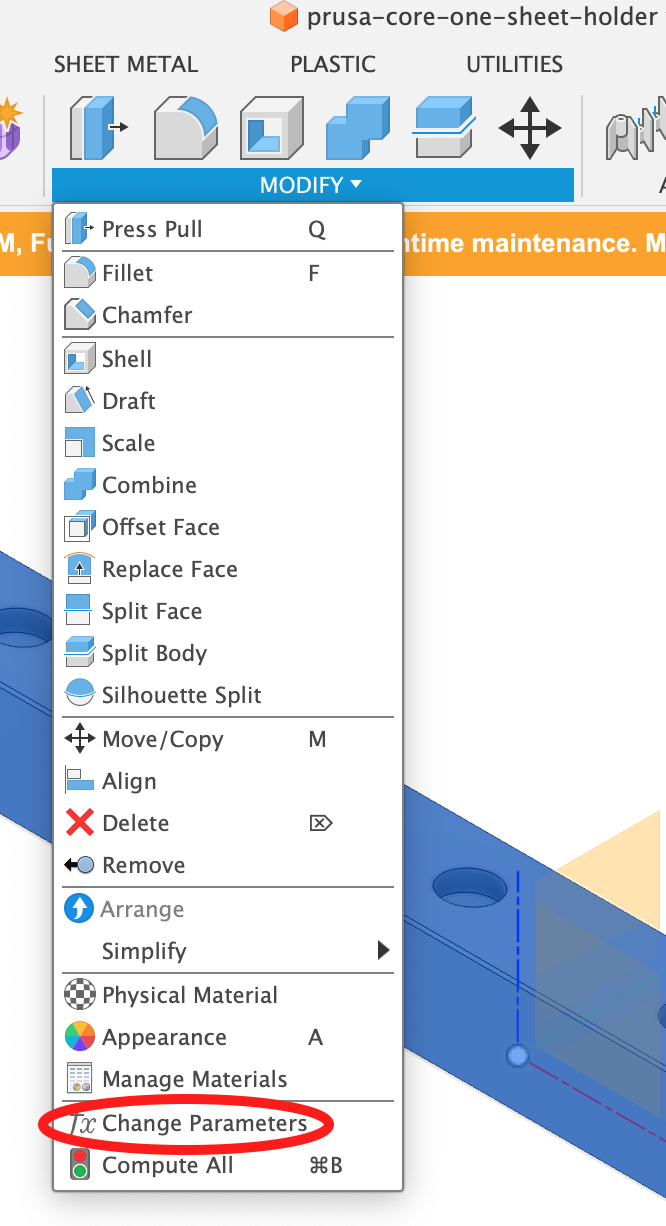
Change the model's parameters in autodesk fusion by clicking modify -→ change parameters
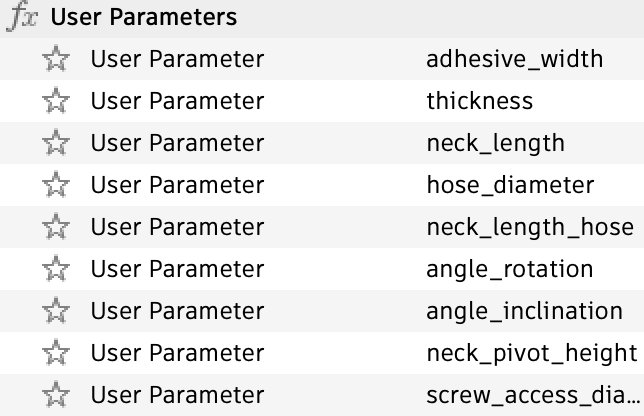
Several parameters are available, but you'll most likely want to change one of the following
hose_diameter - set this to the inner diameter of your hose. The part will resize the outer circle diameter so that your hose smoothly slides onto it.
angle_rotation - change the xy angle of your hose. 0 degrees is pointing right. 90 degrees points up. 180 degrees points left. 270 degrees points down.
angle_inclination - 0 degrees means a right angle. 90 degrees means pointing straight off the back
thickness - how thick do you want the walls?