
Squeaky Toy Squeaker negative
Iris Martinez

Trouver des similitudes avec l'IA
Profil d’impression(0)
Fichier modèle(0)
 0
0 0
0 0
0
Publié:2026-01-18 22:56:28
0
0
 000
000I wanted to make a 3D printable rubber duck that squeaks like a regular one. This is a file you can use to subtract a hole in an existing model to help make it squeak. There are some tricks you have to do in the slicer to get it to work, so see below for full details.
This video shows one I printed so you can see how it sounds.
It was made using the duck from this paid model collection: https://www.3dpprofessor.com/product/chibimals-on-the-farm-pack/
Ensure your model can be printed with no infill and still maintain air tightness.
It will need to be printed in a flexible material like TPU.
Use a 3D modeling tool (PrusaSlicer works for this) to subtract the squeaky_neg.stl from your model.
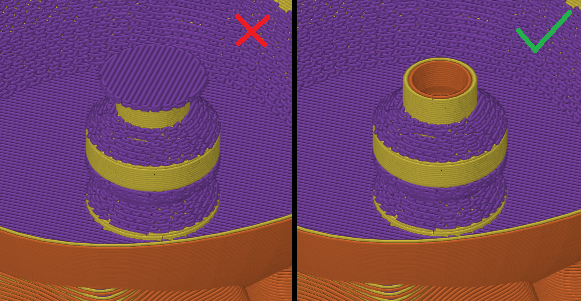
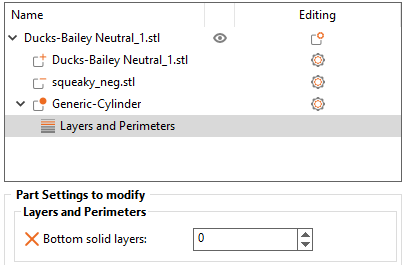
Default slicer settings will cover the hole, not allowing air to travel through, so we will need to tell the slicer to skip that for the top of the hole. In PrusaSlicer I add a cylinder modifier then move and size it to cover the area around the hole, then I add a settings override and set the “Bottom solid layers” to 0 layers. After slicing, this is how the inside should look before and after creating the modifier.
Once a path for air to travel through is created, it should be ready to print.
