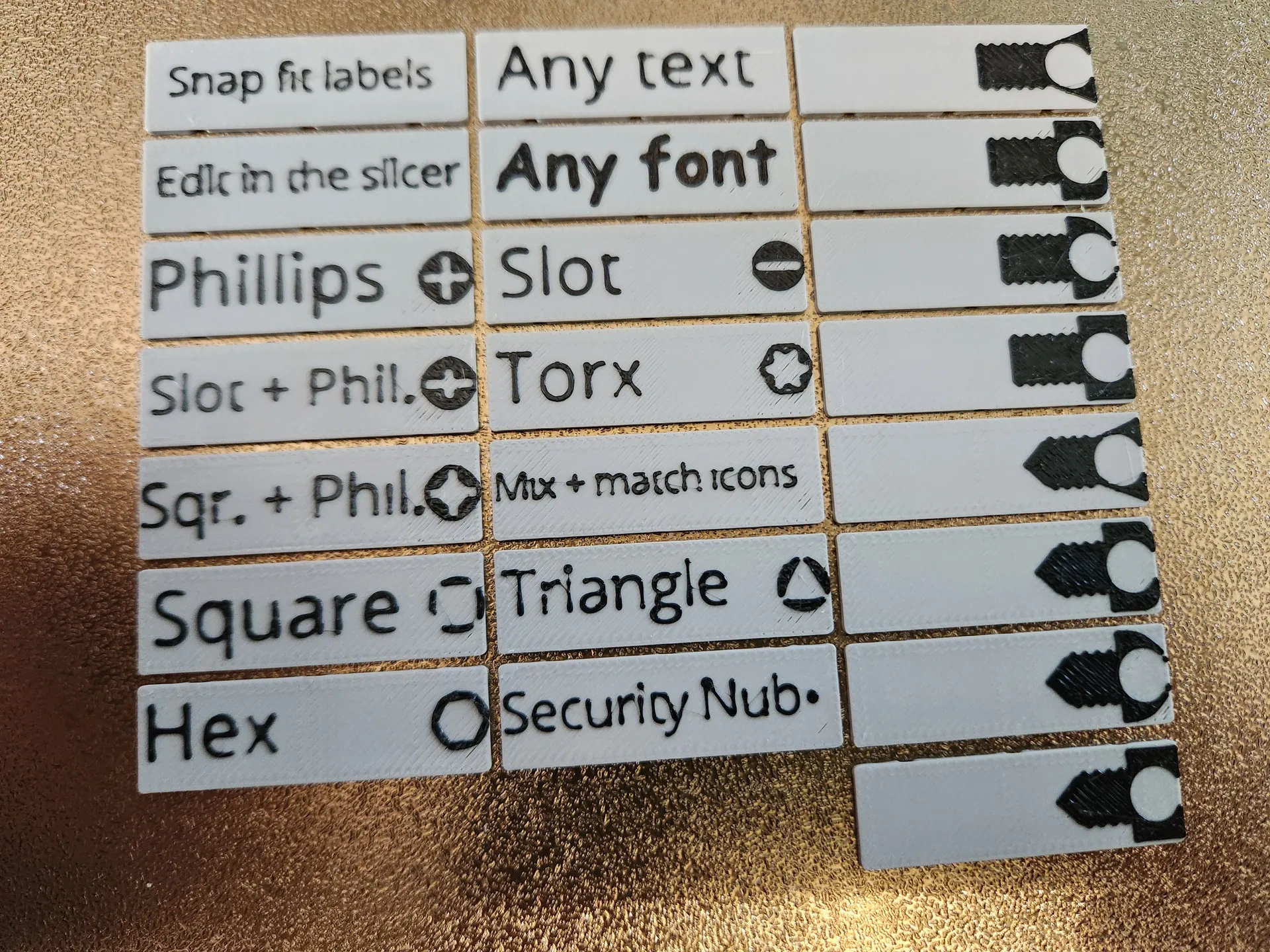
Cullenect is a replaceable label, suitable for Gridfinity and other products.
SnappyRapids
Agregar el perfil de impresión
Denunciar modelo
Encuentre similares con IA
Todos los dispositivos
Abrir en Flash Studio Desktop
Abrir en Orca Slicer
Descargar perfil de impresión (3MF)
Descargar archivo del modelo (STL/CAD)
No hay archivos fuente del modelo
Perfil de impresión(0)
Archivo de modelo(0)
0
0
0
Publicado:2026-05-07 11:43:20
0
0
Descripción
Fuente del modelo
Comentarios(0)
Este contenido se ha traducido automáticamente. Mostrar original
Cullenect replaceable label system
I like the look of printed labels, but I hate having to reprint my container labels every time I need to move parts to a larger container. I also hate how difficult it is to find consistent theme icons for various screws and their screwdrivers.
You only need to print the labels once, and then transfer them between containers when you need to increase or decrease the storage capacity.
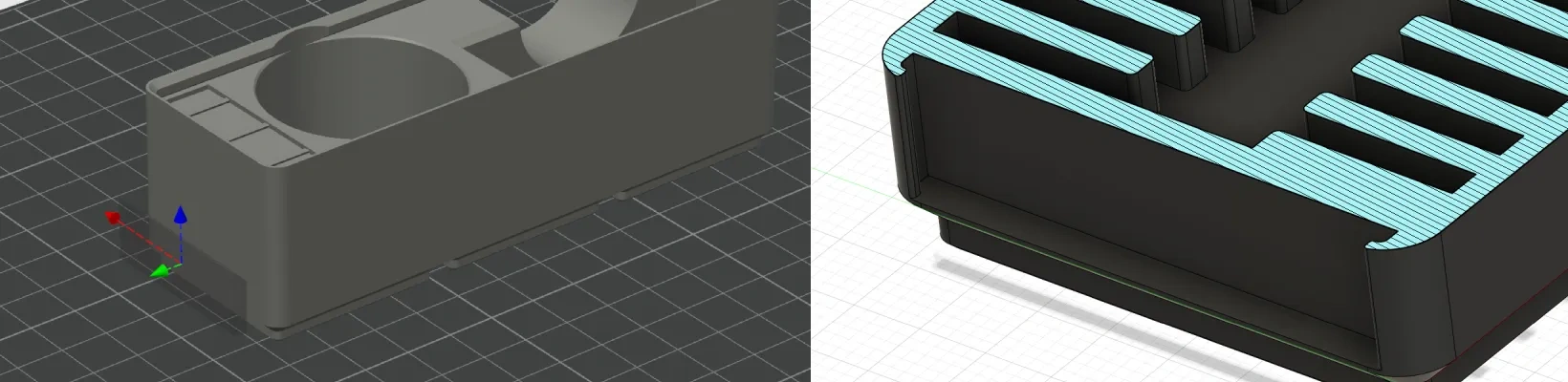
It includes various Gridfinity containers with built-in label sockets, or you can use the “<” symbol.Gridfinity Extended"Generate your own container with a labeled socket."
Use the negative volume included in the slicing software to add label sockets to any 3D-printed object, including other Gridfinity containers.
Use the customizer/OpenSCAD to generate custom labels of any size, whether larger or smaller.
Download the complete collection to create any combination of fasteners, screwdrivers, and label texts.
Please support meAny and all help would be greatly appreciated!
Mix and match screw types and screwdriver types:
I've generated all kinds of screw types and screwdriver types.Just add them to your slicing software and combine them to use themThus, hundreds of combinations can be created!
I've already added some print configuration files for your use, but this is just for convenience. You can freely create any labels your hardware requires.
Available icons in the current collection:
Screw type:
Round-headed machine screws
Hexagonal head machine screws
Machine screws with a flat head
Blind machine screws
Round head self-tapping/wood screws
Self-tapping/wood screws with internal hexagonal head
Self-tapping head screws/wood screws
Self-tapping screws/wood screws
Part of the threaded round-head machine screws
Part of the machine screws with internal hexagonal heads and threaded ends
Part of the machine screws with threaded heads
Part of the machine screws with sunken thread
Flange head
Screwdriver types:
Internal hexagon
Cross
A cross plus a single character
Cross + square head
One character
Square-headed
Torx/star-shaped
Triangle
Safety screwdriver head
Hardware types:
Nuts
Gasket
Locking washer
Threaded inserts
T-type nut
Hexagonal nut
Nylon locking nut
Magnet
Crimping ring
Crimping pliers
Crimping shovel
Crimped socket
Pre-generated size text:
M2x[3-75]
M2.5x[3-75]
M3x[3-75]
M4x[3-75]
M5x[3-75]
M6x[3-75]
Available prefabricated containers in the collection:
The height of the prefabricated containers ranges from 3U to 10U:
1x1
1x2
1x3
2 for 1
2x2
2x3
3x1
3x2
It is compatible with almost any container that uses negative volume
In the collection, I included a vertical and horizontal negative volume STEP file, which you can use in slicing software to carve out the space needed to place the labels.
Setting of the slicing software:
If the default settings result in the labels being too tight or too loose, I recommend using the following settings in your slicing software:
Elephant-foot compensationStarting from the default value (0.15), increase or decrease it if the snap is too tight or too loose.
The bottom edge:Disable
External wall generator:Arachne
Initial tower: Optional, but recommended
Floor height:
0.2mm nozzle: 0.1mm layer height
0.4mm nozzle: 0.2mm layer height
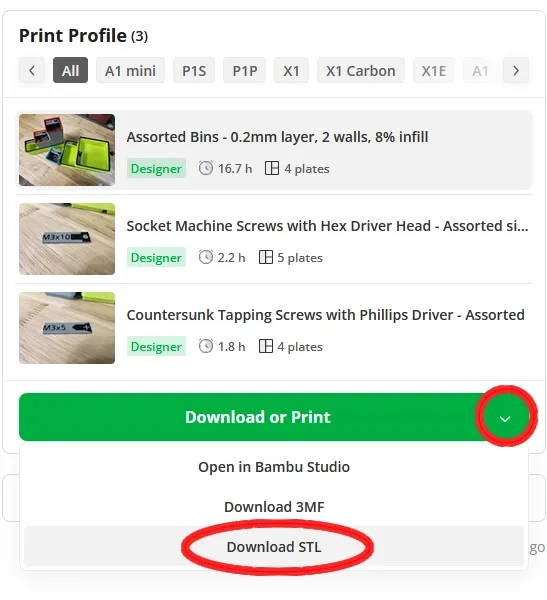
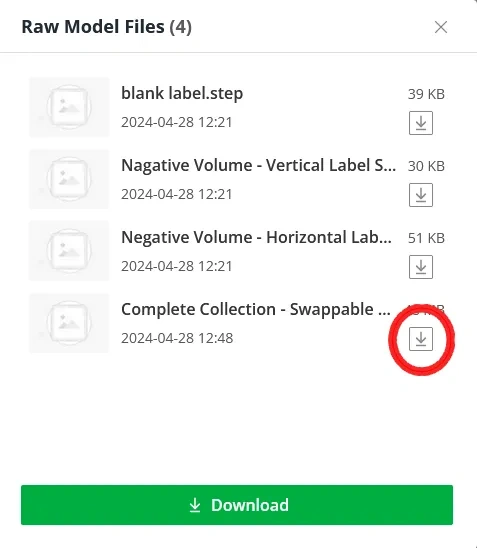
How to download the complete collection:
The method of downloading the .zip file containing all the .step files needed to create your own labels is not obvious, so here are some instructions.
Click on "Download or Print", and then click on "Download STL".
Click the download icon next to "Complete Collection"
Change log:
v2.0.2 was released on March 18, 2025.
New features: According to the request of user @Sokonomi, in addition to engravings/embossments, we have also added flush-mounted icons/text options.
New features:Adjustable X and Y tolerances for 3D printing.
A new fastener head modifier:According to the request of user @Cattywhompus, the flange fastener head has been added.
The new hardware icons: According to the request of user @core3ddesigns, nylon locking washers have been added.
The new hardware icons: According to the request of user @TMaxV, the crimp connectors have been added.
v2.0.1 was released on January 25, 2025.
Geometric changes: The size of the generated labels has been fixed. The old width of some labels was 36.4mm, instead of the new width of 36mm.
The new Gridfinity container: According to the request of user @BenLue, the height has been increased from 7U to 10U.
v2.0.0 was released on December 22, 2024.
Geometric changes:The locking mechanism has been completely overhauled and made into a side-mounted type. It allows the use of custom-sized labels.
Gridfinity container changes: The standard glue-magnet holes have been removed, and sliding friction-fit magnet holes have been added instead.
The new hardware icons:The T-shaped nut has been added!
The new screw size:2.5mm!
v1.1.0 was released on May 2, 2024.
Geometric changes: The label card buckle has been updated. It is backward compatible, but the clicking sensation is more satisfying!
The new screw icon:Some threaded machine screws have been added!
The new hardware icons:The nut has been added!
v1.0.0 was released on April 28, 2024.
Released!
Ongoing future changes and additions
Please request screws/screwdrivers/hardware icons in the comments!I'll do my best to add them to the collection and list you as the requestor.
SMD/THT symbols
PCB/Arduino
XT60/XT90 connectors and other power connectors
Wing nut and carriage bolt - a request for naked-roots on Reddit.
GFLABEL by Nicholas Devenish- A Python script used to generate the clickable labels shown here, or "Pred"-style labels, as well as other icons such as resistors and other electronic components, which I haven't implemented yet.
This project inheritsThe original Gridfinity project released by Zack FreedmanThe MIT license. There is no MIT license option on this website, so I chose a similar license, but the MIT license should be considered an active license.


 0
0 0
0 0
0