
gNASty gnorc (Raspberry Pi NAS)
cheerytimber8

Mit KI Ähnliches finden


Druckprofil(0)
Modelldatei(0)
 0
0 0
0 0
0
Veröffentlicht:2026-04-06 17:03:22
0
0



 000
000I installed Debian Lite on the Pi with Open Media Vault for software using this tutorial: https://pimylifeup.com/raspberry-pi-openmediavault/. The block diagram below shows how everything is attached.
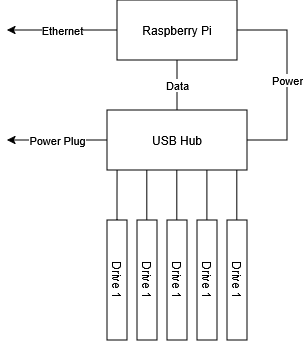
Note: this design focuses on low cost and reliability, it is NOT fast.
QTY 35 M3x10 Flathead screws https://www.amazon.com/dp/B0DK1CF7RM?ref=ppx_yo2ov_dt_b_fed_asin_title&th=1
QTY 31 M3x6 Threaded Inserts https://www.amazon.com/dp/B0DK1CF7RM?ref=ppx_yo2ov_dt_b_fed_asin_title
Raspberry Pi: Any model should be physically compatible, use what meets the hardware requirements for your software. I used CM4 w/adapter board
USB Hub https://www.amazon.com/dp/B00SCX6I8A?ref=ppx_yo2ov_dt_b_fed_asin_title&th=1
QTY 1-5 USB Hard Drives: I used a combination of usb hard drives and old laptop hard drives with Sata-USB adapter cables.
I included a blank nameplate for adding different text. It's a separate piece because my only multicolor printer is small.
There are two screws on the left edge that can's both be installed (installing one blocks access to the other. I left both sets of holes in so you can choose which one to install to correct for any warping.
The width of the bays are as follows: 2x12mm, 2x17mm, 1x24mm. If you have specific dimensions you need, message me and I can modify it pretty quickly.
This should work with any material, there are no special features and nothing really gets hot. I used PETG at 20% infill just because I plan on this sitting unattended for years and I don't want to have to replace anything if the sun shines on it.
